|
Sentry Page Protection
Advanced Data Manipulation [2-6]
In the data manipulation module, we have learned how to concatenate and merge data sets. There is also another way to combine data sets. Let's look at an example. Interleaving Data Sets 
When interleaving data sets, you are inserting the observations from each data set in the order of the by-group variable. Let's look at an example. The code above creates two data sets:
Each data set contains two columns and three observations: The INDS1 data set contains ID 101, 103 and 105: 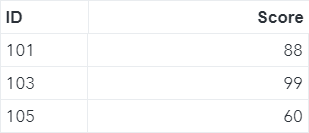
The INDS2 data set contains ID 102, 104 and 106: 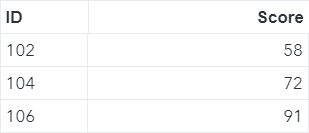
You can interleave these two data sets by using the SET statement and the BY statement. Example data inds; set inds1 inds2; by ID; run; This is a very simple data step with a SET statement on the INDS1 and INDS2 data sets. There is also a BY statement on the ID variable: 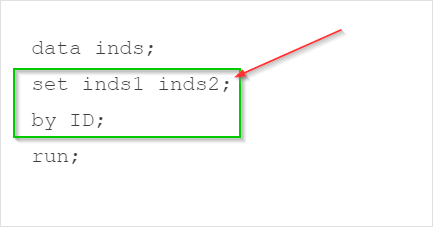
When executing the step, SAS inserts the observations into the output data set based on the order of the ID column. In the first data step iteration, SAS inserts the observation with ID 101: 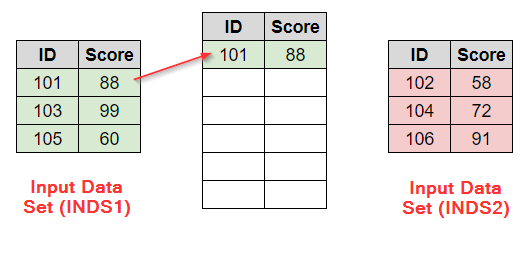
In the second data step iteration, SAS inserts the observation from the next by-group (i.e. ID 102). 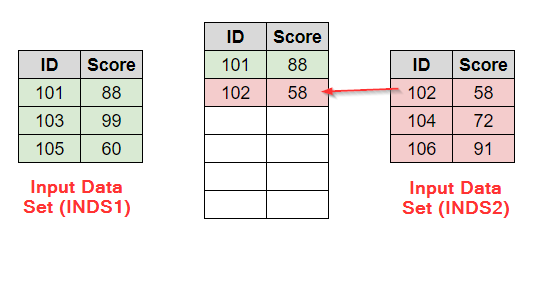
SAS continues until all of the observations are inserted into the output data set: 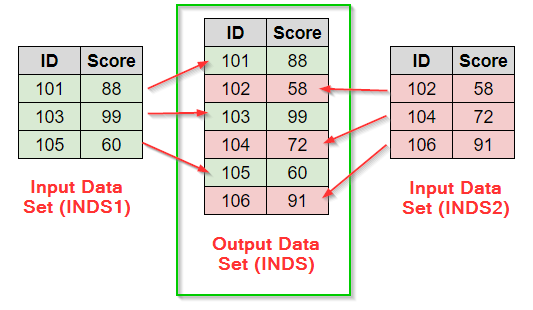
Programming Tips:
Exercise
Copy and run the code from the yellow box below: The code above creates two data sets:
Each data set contains a list of students. Interleave these two data sets using the NAME variable as the by-group. Need some help?
HINT: SOLUTION: proc sort data=male; by name; run; data combine;
Fill out my online form.
|