|
Sentry Page Protection
Handling Date Values [1-7]
Date Constant A date constant allows you to specify a date value in SAS.
Let's look at an example. Example Copy and run the PROFILE data set from the yellow box below. The PROFILE data set contains three subjects with their date of birth (DOB). 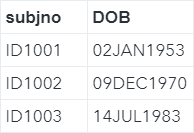
Now, we are going to find the subjects who were born before Jan 1, 1960. We have learned that, in SAS, the date of Jan 1, 1960 is represented by the numeric value 0. We can simply filter the data set using an IF or WHERE statement: data profile_before_1960; set profile; if dob < 0; run; The resulting data set lists the subject who was born prior to Jan 1, 1960: 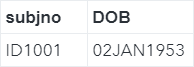
This is easy. However, what if you want to find the subjects who were born before Jan 1, 1980? How do you find the numeric date representation of the first day of 1980? You can use a date constant to achieve this. Example data profile_before_1980; set profile; if dob < '01JAN1980'd; run; A date constant consists of:
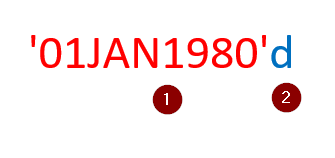
The letter 'd' tells SAS the value within quotation is a date constant. It returns the numeric date representation of Jan 1, 1980. When running the data step above, SAS will keep only the subjects who were born prior to Jan 1, 1980: 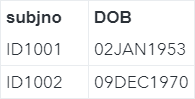
Time Constant The time constant is similar to the date constant. Let's look at an example. Copy and run the code from the yellow box below: There were 10 subjects visiting a clinic on Jan 1 and Jan 2 of 2019. The visiting date and time are captured in the VISIT data set. 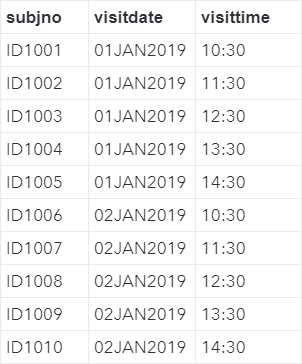
Now, we are going to look at the subjects who visited the clinic in the afternoon (i.e. after 12 pm). data afternoon; set visit; if visittime > '12:00't; run; In this example, we have specified a time constant in the format of: '12:00't The letter 't' tells SAS the value within quotation is a time constant. It returns the numeric time representation of the time of 12:00 pm. The data step above will keep only the afternoon visits: 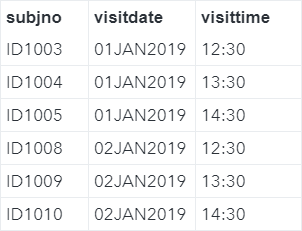
Exercise
The SASHELP.STOCKS data set contains the stock prices for IBM, Intel and Microsoft between August 1, 1986 and December 1, 2005. Create a new data set called STOCKS2 that contains the stock prices on or after Jan 1, 2004, for the three stocks. Need some help?
HINT: SOLUTION: data stocks2;
Fill out my online form.
|