Sentry Page Protection
Proc SQL [13-14]
HAVING Clause
SELECT subject,
mean(results)
AS ClassAvg
FROM exam
GROUOP BY subject
HAVING classavg > 80;
mean(results)
AS ClassAvg
FROM exam
GROUOP BY subject
HAVING classavg > 80;
The HAVING clause filters the output similar to the WHERE clause.
However, the HAVING clause is used only when you summarize the data.
Let's take a look at some examples.
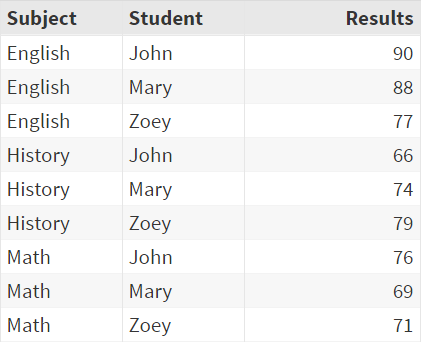
Copy and run the EXAM table from the yellow box below in your SAS Studio:
The EXAM table contains three columns:
- Subject
- Student
- Results
Restriction of WHERE Clause
The WHERE clause can be used to select individual rows of data from the table.
Example
Restriction of WHERE Clause
The WHERE clause can be used to select individual rows of data from the table.
Example
Proc sql;
select *
from exam
where results >80;
quit;
select *
from exam
where results >80;
quit;
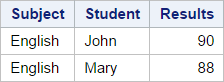
The WHERE clause in this example selects the individual rows where the results are greater than 80.
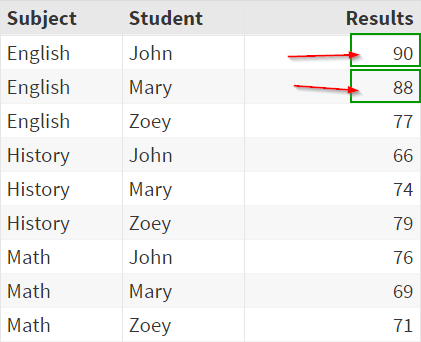
The rows that meet the condition are selected:
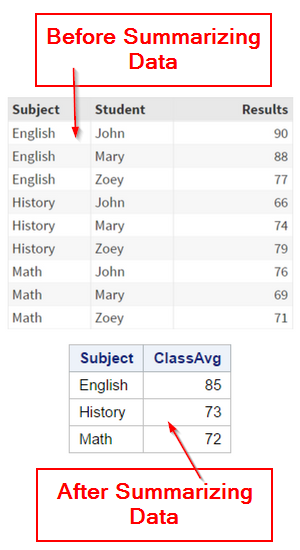
Now, let's summarize the data and compute the class average for each subject.
Example
Proc sql;
select subject,
mean(results)
as ClassAvg
from exam
group by subject;
quit;
select subject,
mean(results)
as ClassAvg
from exam
group by subject;
quit;
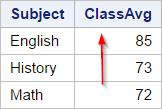
The Proc SQL step above computes the class average for each subject:
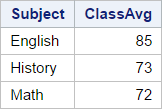
The class average for English, history and math are 85, 73 and 72, respectively.
Now, we are going to keep only the subjects with a class average higher than 80.
In this example, it will be the English subject:
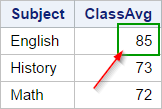
The logical clause to use would be the WHERE clause. However, using the WHERE clause here will generate an error message.
Example
Proc sql;
select subject,
mean(results)
as ClassAvg
from exam
where calculated
classavg > 80
group by subject;
quit;
select subject,
mean(results)
as ClassAvg
from exam
where calculated
classavg > 80
group by subject;
quit;
The WHERE clause tells SAS to keep only the rows where the class average is above 80.
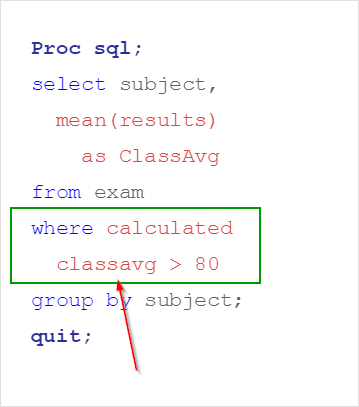
The following message is generated in the Log window:
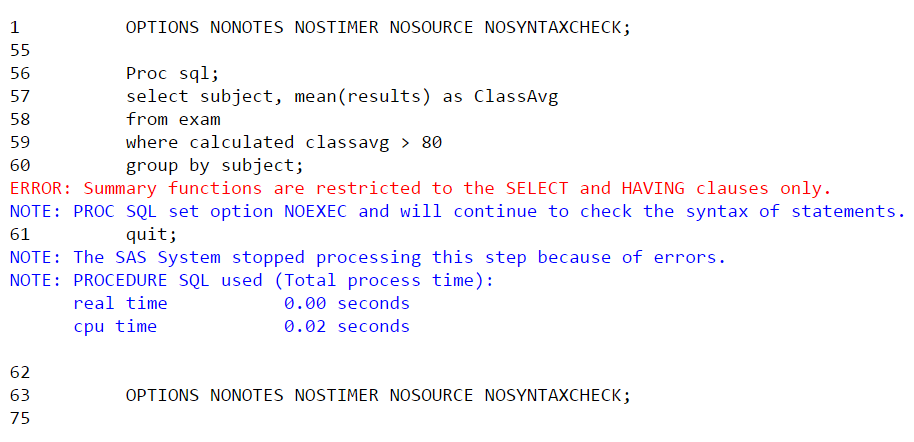
ERROR: Summary functions are restricted to the SELECT and HAVING clauses only.
There is an error because the WHERE clause can only be used to filter the table before the data is summarized.
It cannot work with the CLASSAVG column that is generated after the data is summarized.
In order to filter the summarized table, you must use the HAVING clause.
Example
Proc sql;
select subject,
mean(results)
as ClassAvg
from exam
group by subject
having classavg > 80;
quit;
select subject,
mean(results)
as ClassAvg
from exam
group by subject
having classavg > 80;
quit;
Note: the HAVING clause must be placed after the GROUP BY clause.
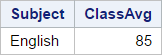
In this example, the HAVING clause selects only the subject with a class average higher than 80.
Only the English subject is selected:
Exercise
Locate the CARS table from the SASHelp library.
Write a Proc SQL step to compute the average MSRP for each car maker. Display only the car makers whose average MSRP is above $50,000.
Locate the CARS table from the SASHelp library.
Write a Proc SQL step to compute the average MSRP for each car maker. Display only the car makers whose average MSRP is above $50,000.
Need some help?
HINT:
The HAVING clause must be used when filtering the summarized data in the Proc SQL output.
SOLUTION:
proc sql;
select make, mean(msrp) as mean
from sashelp.cars
group by make
having mean > 50000;
quit;
Fill out my online form.