Sentry Page Protection
Proc SQL II [10-17]
Additional Examples of Set Operators
Now that we have learned the basics of the Set operators in Proc SQL, let's look at how you can apply them to solve practical business problems.
Copy and run the code from the yellow box below:
Copy and run the code from the yellow box below:
The SALES table contains four columns:
- DAY
- DESKTOPS
- LAPTOPS
- TABLETS
The last three columns represent the sales for each product on a particular day:
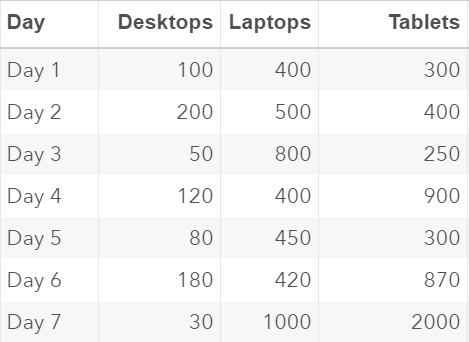
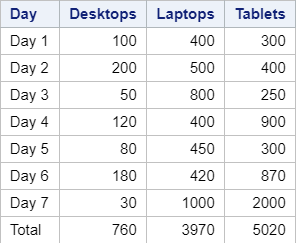
Now, let's assume you'd like to compute the total sales for each product. The total sales would be displayed in the last row of the table, as seen in the example below:
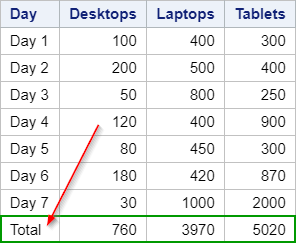
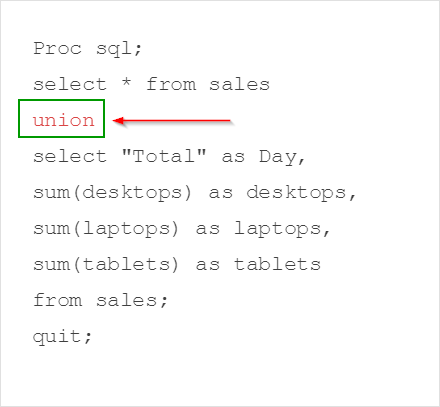
One way to achieve such a result is to use the Union Set operator in Proc SQL:
Proc sql;
select * from sales
union
select "Total" as Day,
sum(desktops) as desktops,
sum(laptops) as laptops,
sum(tablets) as tablets
from sales;
quit;
select * from sales
union
select "Total" as Day,
sum(desktops) as desktops,
sum(laptops) as laptops,
sum(tablets) as tablets
from sales;
quit;
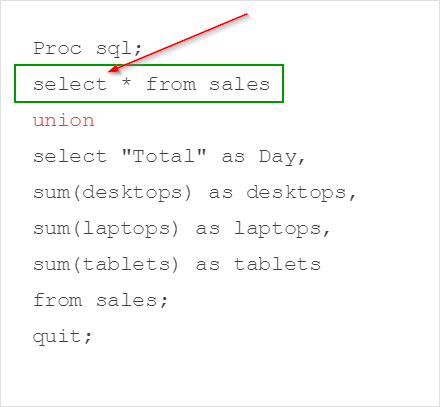
The first query selects the entire SALES table:
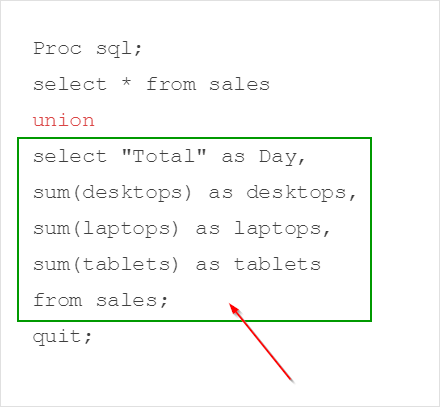
The second query computes the total for the desktops, laptops and the tablets:
The Union Set operator concatenates the tables created by the two queries:
The output table contains the original table with the total calculated and displayed in the last row of the table:
Let's look at another example.
Copy and run the code from the yellow box below:
The code above creates four tables:
- DEPT1
- DEPT2
- DEPT3
- MANAGER
The DEPT1, DEPT2 and DEPT3 tables each contain a list of employees and their department.
Below is the DEPT1 table:
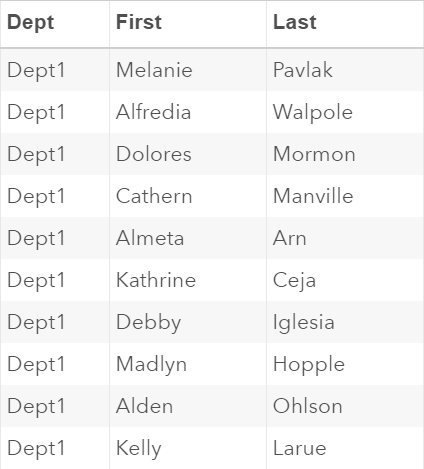
The MANAGER table contains the list of managers working for this company.
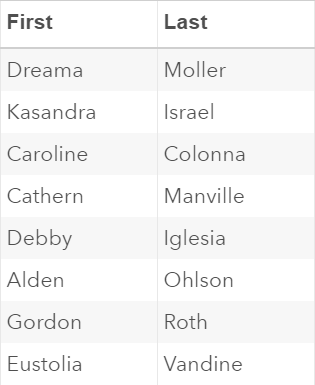
Now, we'd like to get a list of unique employees in this company who are NOT managers.
We can create this list by using multiple Set operators:
proc sql;
(select first, last from dept1
union
select first, last from dept2
union
select first, last from dept3)
except
select first, last from manager;
quit;
(select first, last from dept1
union
select first, last from dept2
union
select first, last from dept3)
except
select first, last from manager;
quit;
The first three queries created a list of all employees working for this company:
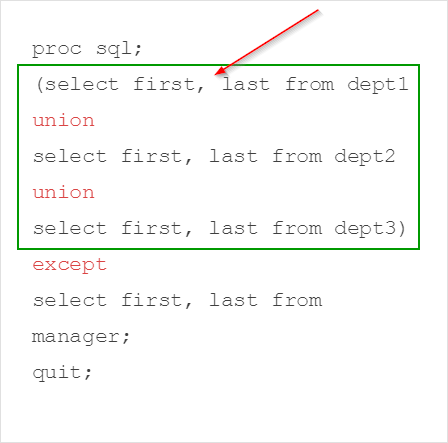
The EXCEPT operator then excludes the managers from the MANAGER table.
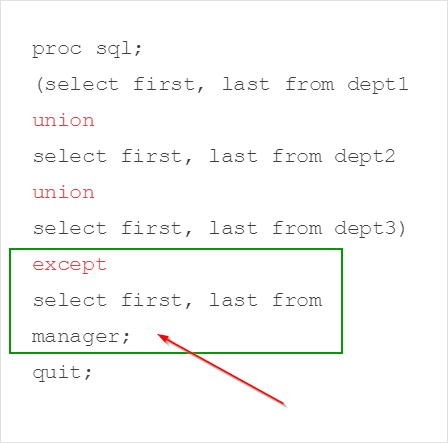
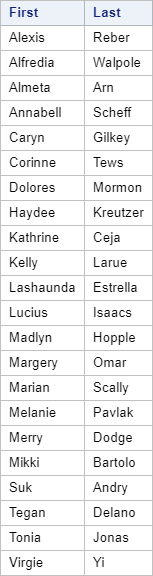
This results in a list of unique employees who are not managers in this company.
Let's look at one more example.
Copy and run the code from the yellow box below:
The code above creates two tables:
- TRANSAC
- REFUND
The TRANSAC table contains a list of 10 transactions:
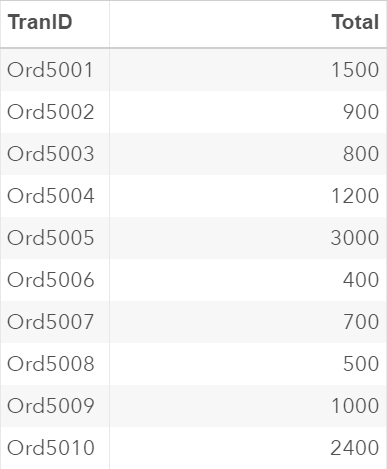
The REFUND table contains two transactions that are refunded:
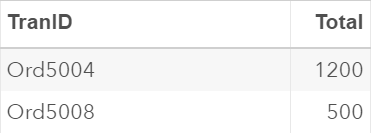
We'd like to compute the total revenue generated from all of the transactions after the refunds.
This can again be done by using the EXCEPT operator:
Proc sql;
select sum(total) as totrevenue
from
(select * from transac
except
select * from refund);
quit;
select sum(total) as totrevenue
from
(select * from transac
except
select * from refund);
quit;
Note: the FROM clause in this example contains what we call an in-line view:
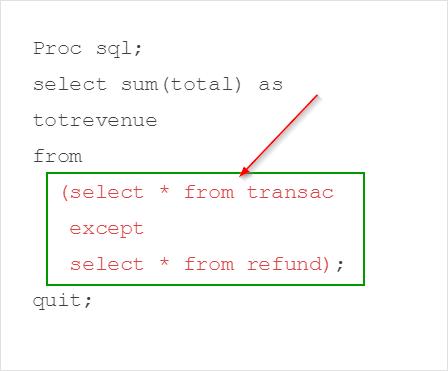
An in-line view is a query nested in the FROM clause.
It creates a temporary table that can be referenced in the Proc SQL query.
In this example, the temporary table contains all of the transactions that are not refunded.
The total revenue (i.e. TOTREVENUE column) is then calculated based on this temporary table.

The total revenue after refunds is $10,700.
Exercise
Copy and run the code from the yellow box below:
Copy and run the code from the yellow box below:
The code above creates three tables:
- STORE1
- STORE2
- ONLINE
These tables contain the transaction records for a clothing company that has two retail stores and one online store.
Write a Proc SQL step to compute the total sales by category (i.e. men, women, children and mixed) for the entire company.
Need some help?
HINT:
You must first combine the three tables using the Outer Union operator before calculating the total sales.
SOLUTION:
proc sql;
select category, sum(total) as total
from (select * from store1
outer union corr
select * from store2
outer union corr
select * from online)
group by category;
quit;
Fill out my online form.