Sentry Page Protection
Proc SQL II [15-17]
Altering Columns
In the previous sections, we have learned how to insert and update rows in a SAS table.
You can also alter the table columns in the SQL procedure.
Let's look at an example.
Copy and run the code from the yellow box below:
You can also alter the table columns in the SQL procedure.
Let's look at an example.
Copy and run the code from the yellow box below:
The PROFILE table contains a list of five subjects with the following three columns:
- ID
- GENDER
- DOB (Date of Birth)
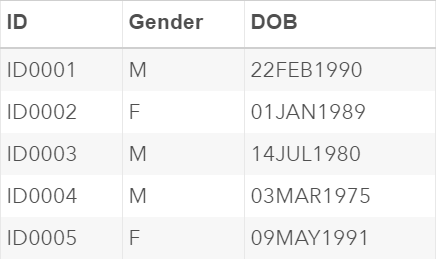
Let's look at how you can add, drop and modify the columns in the PROFILE table.
Example
Proc sql;
create table profile_new as
select * from profile;
alter table profile_new
add age num
drop gender;
quit;
create table profile_new as
select * from profile;
alter table profile_new
add age num
drop gender;
quit;
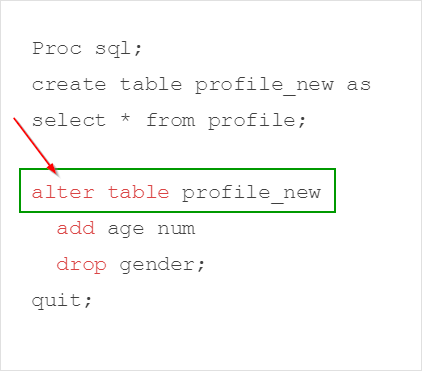
Table columns can be added, dropped or modified using the ALTER statement:
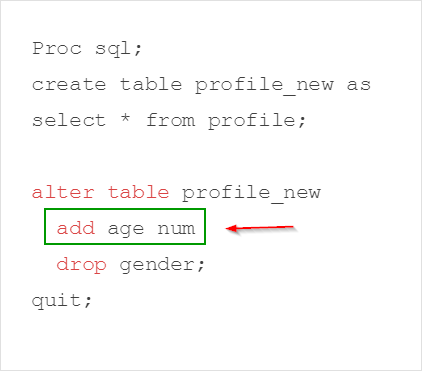
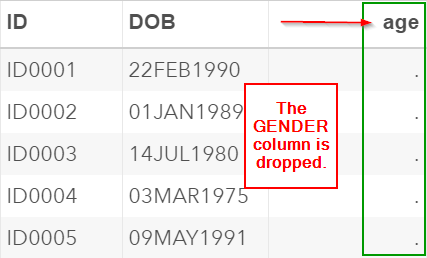
The ADD clause adds the AGE column to the PROFILE_NEW table.
The column type is defined as numeric:
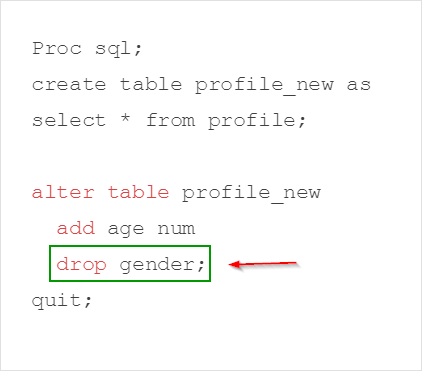
The DROP clause drops the GENDER column from the table:
The PROFILE_NEW table has now added the AGE column and the GENDER column is removed:
You can also modify an existing column using the MODIFY clause in the ALTER statement.
Let's look at an example.
The DOB column is assigned the format of (date9.). The date is displayed in the form of DDMMMYYYY (e.g. 22FEB1990).
We are going to change its format to (yymmdd10.) using the MODIFY clause.
In addition, we will increase the length of the ID column from eight to 20.
Example
Proc sql;
create table profile_new as
select * from profile;
alter table profile_new
modify ID char (20)
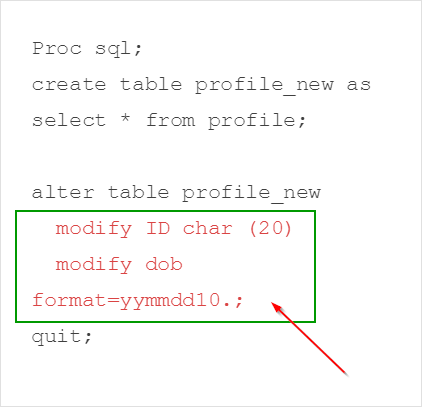
modify dob format=yymmdd10.;
quit;
create table profile_new as
select * from profile;
alter table profile_new
modify ID char (20)
modify dob format=yymmdd10.;
quit;
The first MODIFY clause assigns a new length of 20 to the ID column. The format of the DOB column is also changed to (yymmdd10.).
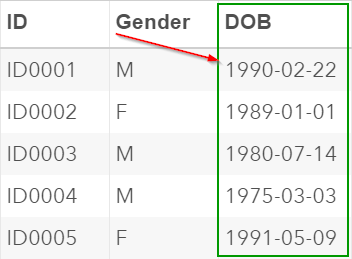
The DOB column is now displayed based on the format of (yymmdd10.).
Exercise
Locate the CLASS table from the SASHelp library.
Copy the CLASS table into the Work library. Name the table as CLASS.
Write a Proc SQL step to add two new columns to the table:
In addition, drop the HEIGHT and WEIGHT columns from the table.
Locate the CLASS table from the SASHelp library.
Copy the CLASS table into the Work library. Name the table as CLASS.
Write a Proc SQL step to add two new columns to the table:
- ENROLDATE: the column that captures the student’s date of enrollment. It should be assigned the format of (yymmdd10.).
- RESULTS: the column that captures the student’s overall score in the class. It should be a numeric column.
In addition, drop the HEIGHT and WEIGHT columns from the table.
Need some help?
HINT:
The ADD, DROP or MODIFY clauses must be used in the ALTER statement.
SOLUTION:
Proc sql;
create table class as
select * from sashelp.class;
alter table class
add EnrolDate num format=yymmdd10.,
Results num
drop height, weight;
quit;
Fill out my online form.