SAS Project Training 1
[6-6]
[6-6]
From the previous sections, you have learned how to restructure the data sets from France and Germany and load them into the online_retail data set.
Well done! However, it is tedious to have to do the same task every month whenever new data is received.
A smart programmer writes a macro to automate this task.
We will first create a new data set called online_retail_master:
data online_retail_master;
set a.online_retail;
run;
set a.online_retail;
run;
The online_retail_master data set contains the same set of data from online_retail.
Now, we will create a macro that allows you to load the new data set into the online_retail_master data set.
Run the entire program below in your SAS Studio:
%macro load(
data=,
country=
);
proc sql noprint;
select count(*) into :initialcount from online_retail_master
where country="&country."
;
quit;
%if &country. = France %then %do;
data &data._clean;
set &data.(rename=(customerID=CustomerID_char));
CustomerID=input(CustomerID_char,best32.);
format customerid best12.;
invoice_date=mdy(invoice_mon,invoice_day,invoice_year);
invoicedate=dhms(invoice_date,0,0,invoice_time);
format invoicedate datetime.;
drop CustomerID_char invoice_date invoice_mon invoice_day invoice_year invoice_time;
run;
%end;
%if &country. = Germany %then %do;
proc sort data=&data. out=sales_sort;
by stockcode;
run;
proc sort data=a.germany_products out=germany_sort;
by stockcode;
run;
data combine;
length match_flag $20;
merge sales_sort(in=a) germany_sort(in=b);
by stockcode;
if a and b then match_flag='in both';
else if a then match_flag='sales only';
else if b then match_flag='product list only';
run;
proc freq data=combine;
tables match_flag;
run;
data &data._clean;
set combine;
where match_flag='in both';
drop match_flag;
run;
%end;
proc append base=online_retail_master data=&data._clean;
run;
proc sql noprint;
select count(*) into :newcount from online_retail_master
where country="&country."
;
quit;
%put # of &Country records before load: &initialcount.;
%put # of &Country records after load: &newcount.;
%mend load;
data=,
country=
);
proc sql noprint;
select count(*) into :initialcount from online_retail_master
where country="&country."
;
quit;
%if &country. = France %then %do;
data &data._clean;
set &data.(rename=(customerID=CustomerID_char));
CustomerID=input(CustomerID_char,best32.);
format customerid best12.;
invoice_date=mdy(invoice_mon,invoice_day,invoice_year);
invoicedate=dhms(invoice_date,0,0,invoice_time);
format invoicedate datetime.;
drop CustomerID_char invoice_date invoice_mon invoice_day invoice_year invoice_time;
run;
%end;
%if &country. = Germany %then %do;
proc sort data=&data. out=sales_sort;
by stockcode;
run;
proc sort data=a.germany_products out=germany_sort;
by stockcode;
run;
data combine;
length match_flag $20;
merge sales_sort(in=a) germany_sort(in=b);
by stockcode;
if a and b then match_flag='in both';
else if a then match_flag='sales only';
else if b then match_flag='product list only';
run;
proc freq data=combine;
tables match_flag;
run;
data &data._clean;
set combine;
where match_flag='in both';
drop match_flag;
run;
%end;
proc append base=online_retail_master data=&data._clean;
run;
proc sql noprint;
select count(*) into :newcount from online_retail_master
where country="&country."
;
quit;
%put # of &Country records before load: &initialcount.;
%put # of &Country records after load: &newcount.;
%mend load;
The code above creates a macro called LOAD.
The macro can be used as a blackbox to load your new sales data into the online_retail_master data set.
Let's see how it works.
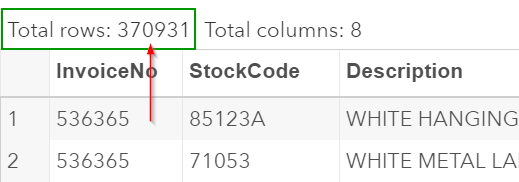
First, we see that the online_retail_master data set contains 370,931 observations:
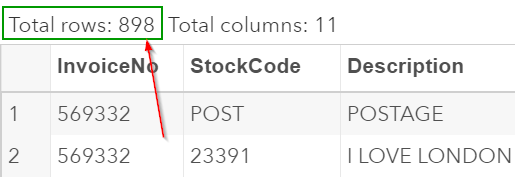
The a.france_sales_201110 data set contains 898 observations.
We are going to call the macro with the code below:
%load(data=a.france_sales_201110,country=France);
When calling the macro, you have to give the macro two pieces of information:
- The data set that you are adding to the online_retail data set, and
- The country that supplied the data.
The macro will do the rest and load the a.france_sales_201110 data set to the online_retail_master data set!
Let's look at the number of observations in the online_retail_master data set after you run the macro:
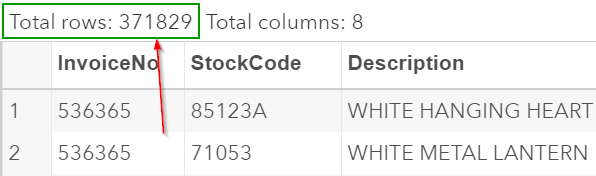
The online_retail_master data set now contains 371,829 observations, which is equal to 370,931 + 898 observations from the France data set.
If you were to also add the data set from Germany to the online_retail_master data set, you can do so with the same macro.
%load(data=a.germany_sales_201110,country=Germany);
The macro again merges the German sales data with the online_retail_master data set.
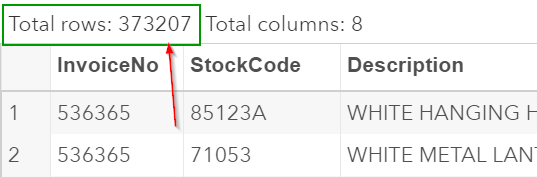
The master sales data set now contains 373,207 records:
You can play around with the macro with some additional data sets below:
Additional data sets from France and Germany:

| france_sales_201111.sas7bdat |
| france_sales_201112.sas7bdat |
| germany_sales_201111.sas7bdat |
| germany_sales_201112.sas7bdat |
We’re done! We have successfully created a macro that allows you to automate the data loading process.
Whenever you receive the sales data from France or Germany, you can simply use the macro to merge the data with the master sales data set.
Fill out my online form.