Sample SAS Training 1
Mathematical Operators
Let's start with something simple.
Below is the NUMBERS data set.
It contains 2 variables: VAL1 and VAL2.
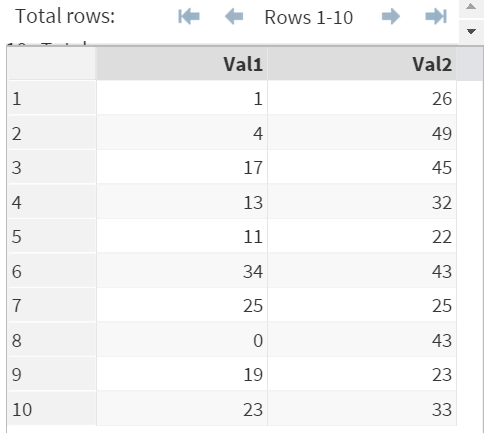
Note: the yellow box below contains the code for the NUMBERS data set.
Copy and run the code to get the NUMBERS data set on SAS Studio.
To add, subtract, multiply and divide values in SAS, you can use the following mathematical operators:
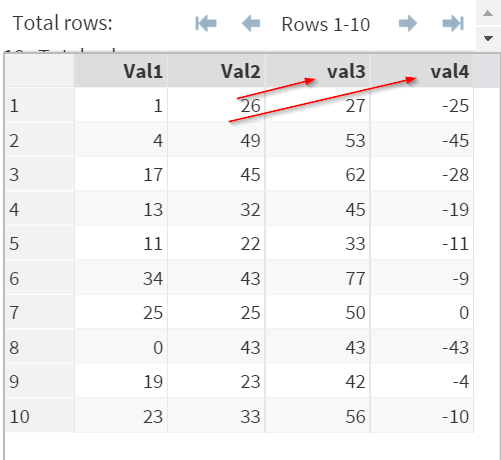
Add & Subtract
Data Math1;
Set Numbers;
val3 = val1 + val2;
val4 = val1 - val2;
Run;
Multiplication & Division
Data Math2;
Set Numbers;
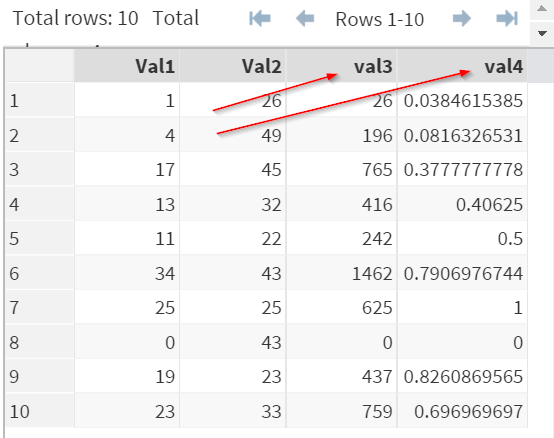
val3 = val1 * val2;
val4 = val1 / val2;
Run;
Exercise
Copy and run the ACCOUNTING data set from the yellow box below.
Copy and run the ACCOUNTING data set from the yellow box below.
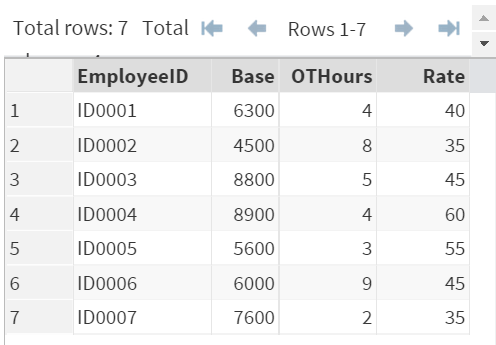
ACCOUNTING contains 4 variables:
EmployeeID: ID
Base: Base Salary
OTHours: Overtime Hours
Rate: Overtime Rate
Employee's salary is calculated as Base Salary + (Overtime Hours x Overtime Rate)
Write a SAS program to calculate the salary for each employee. Create any data set or variables if necessary.
Need some help?
Fill out my online form.