Sentry Page Protection
Data Manipulation [8-18]
Merging data sets
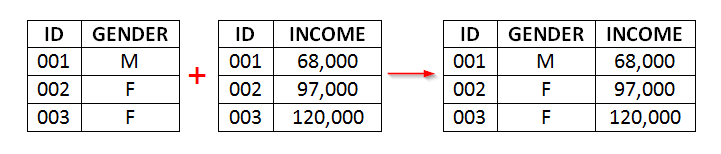
Another way to combine data sets is to merge them side-by-side.
Let's take a look at an example.
Let's take a look at an example.
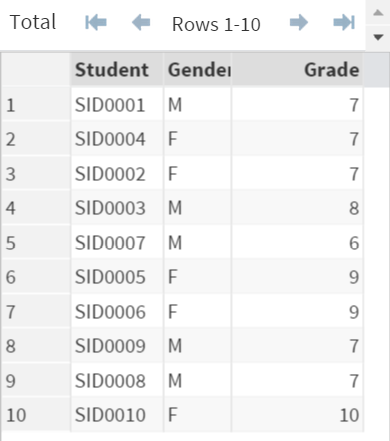
Data set: PROFILE
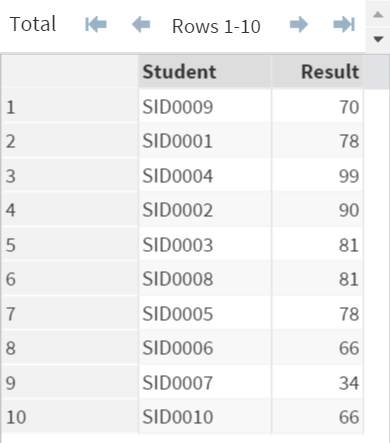
Data set: EXAM
A tutoring school wants to find out which grade performs the best in the previous semester.
They have the PROFILE and EXAM data set:
The PROFILE data set contains the profile of each student such as gender and grade.
The EXAM data set contains the recent exam results.
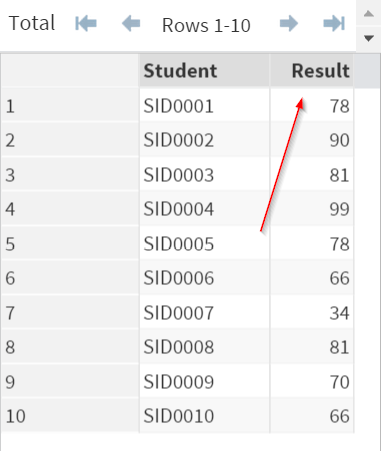
In order to analyze the relationship between grade and exam result, you must first combine the two data sets.
Example
Proc Sort Data=Profile;
By Student;
Run;
Proc Sort Data=Exam;
By Student;
Run;
Data Combined;
Merge Profile Exam;
By Student;
Run;
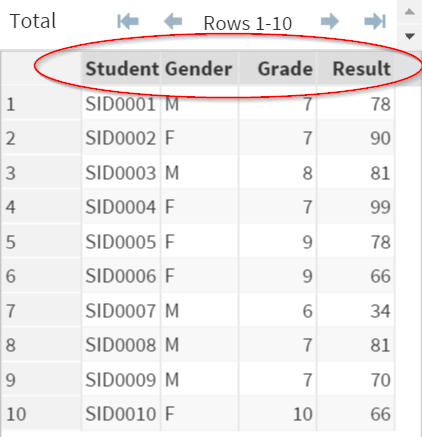
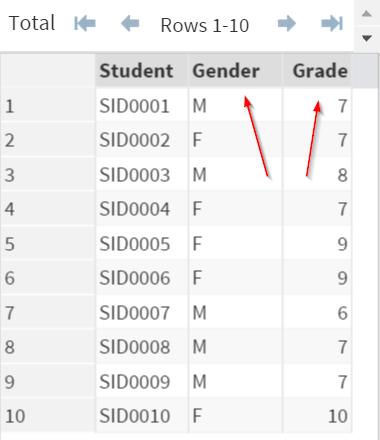
The PROFILE and EXAM data sets are merged into one data set.
The COMBINED data set now contains all of the four variables: Student, Gender, Grade, and Result.
Two Steps Merging Data Sets
When merging the data sets, you can follow the 2 steps below:
Step 1: Sort each of the input data sets by the merging variable(s).
Step 2: Merge the data sets by the merging variable(s).
These will be explained in the next session.
Exercise
Copy and run the CUST and PURCHASE data set from the yellow box below:
Copy and run the CUST and PURCHASE data set from the yellow box below:
A local retail store wants to find out which geographic area responds the best to the marketing campaign.
They have two data sets:
- CUST: the data set that contains the customer ID and their address (zip code)
- PURCHASE: the data set that contains the customer ID and the recent purchase amount
Merge the two data sets by the customer ID.
Create any data set or variable if needed.
Need some help?
HINT:
Did you include the MERGE and the BY statements in the data step?
SOLUTION:
proc sort data=cust;
by ID;
run;
proc sort data=purchase;
by ID;
run;
data Cust2;
merge cust purchase;
by id;
run;
Fill out my online form.