|
Sentry Page Protection
Simple Macro [2-5]
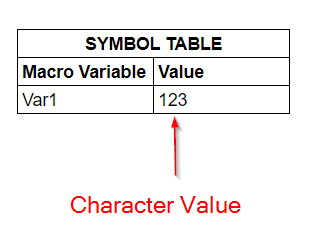
In this section, we will look at how to define a macro variable properly. One easy way to define a macro variable is to use the %LET statement. %let var1 = 123; The %LET statement above defines a new macro variable called VAR1. Its value is 123. So, where is the value stored? The value is stored in what we call a symbol table: 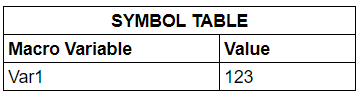
A symbol table is a table that stores the macro values. We cannot directly access this table as we do when accessing other data sets. However, we can view the values using the %PUT statement. %PUT Statement The %PUT statement writes values to the SAS log. Let's look at an example. %put The weather is nice.; The %PUT statement writes this text to the SAS log: The weather is nice. On the SAS log, we see this: 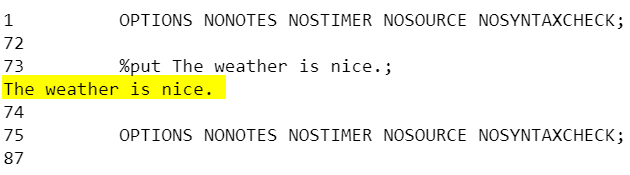
In addition to plain text, we can display the macro variable value using the %PUT statement as well. Example %let var1 = 123; %put The value of var1 is &var1; The %PUT statement above will write to the SAS log a combination of:
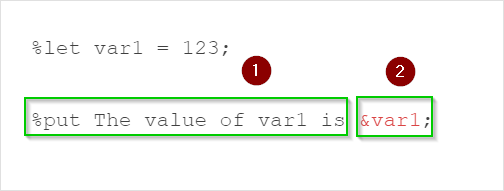
We see this on the SAS log: 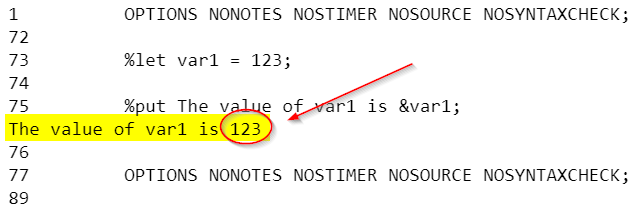
The value of the macro variable VAR1 is displayed. Before we continue, there is an important concept about macro variables that you need to know. The macro variable value is always a text value A macro variable does not distinguish between numeric or character. It is always a character value. E.g.
SAS macro is mostly a text substitution tool. It is used to dynamically substitute text in your program. The value is always stored as a text value. Exercise
Run the code below on your SAS editor: %let computation = x + y; data test; x = 1; y = 8; z = &computation; run; What is the value of:
Need some help?
HINT: SOLUTION: The value of Z is 9. The value of COMPUTATION is X + Y.
Fill out my online form.
|